

Best Way To Study For WGU Web-Development-Applications Exam Brilliant Web-Development-Applications Exam Questions PDF
Updated Verified Pass Web-Development-Applications Exam - Real Questions and Answers
NEW QUESTION # 31
What should be used to request and update data in the background?
- A. AJAX
- B. API
- C. DOM
- D. Canvas
Answer: A
Explanation:
> "AJAX (Asynchronous JavaScript and XML) is a technique used in web development to send and retrieve data from a server asynchronously, without interfering with the display and behavior of the existing page."
> This enables dynamic updates of web content without a full page reload.
References:
* MDN Web Docs: AJAX Introduction
* W3C: XMLHttpRequest API
---
NEW QUESTION # 32
Which method allows the end user to enter text as an answer to a question as the page loads?
- A. Write
- B. alert
- C. Confirm
- D. Prompt
Answer: D
Explanation:
Thepromptmethod in JavaScript displays a dialog box that prompts the user for input, allowing the end user to enter text as an answer to a question when the page loads.
* promptMethod: Thepromptmethod displays a dialog box with an optional message prompting the user to input some text. It returns the text entered by the user ornullif the user cancels the dialog.
* Usage Example:
let userInput = prompt("Please enter your name:", "Harry Potter");
console.log(userInput);
In this example, a prompt dialog asks the user to enter their name, and the entered text is logged to the console.
:
MDN Web Docs onprompt
W3C HTML Specification on Dialogs
NEW QUESTION # 33
Which attribute is related to moving the mouse pointer of an element?
- A. onmouseenter
- B. Onmouseout
- C. Onmouseover
- D. Onmouseup
Answer: C
Explanation:
The onmouseover attribute in HTML and JavaScript is used to execute a script when the mouse pointer is moved over an element.
* onmouseover Attribute: This event occurs when the mouse pointer is moved onto an element. It is commonly used to change styles or content of the element when the user interacts with it by hovering.
* Usage Example:
<p onmouseover="this.style.color='red'">Hover over this text to change its color to red.</p> In this example, the text color changes to red when the mouse pointer is moved over the paragraph.
References:
* MDN Web Docs on onmouseover
* W3C HTML Specification on Events
NEW QUESTION # 34
Which formats does the <audio> element in HTML5 support?
Choose 2 answers.
- A. MPEG-4
- B. Ogg
- C. WMA
- D. M4A
- E. WAV
Answer: B,E
Explanation:
The <audio> element in HTML5 supports the following formats depending on browser support:
WAV: Supported in all major browsers; uses PCM encoding and is uncompressed.
Ogg (Ogg Vorbis): An open-source, patent-free audio format. Supported in Firefox, Chrome, and Opera.
MP3: Widely supported but not included in this question.
M4A and MPEG-4 Audio may or may not play consistently depending on the container and encoding, but they're less standardized across all HTML5 implementations.
WMA (Windows Media Audio): Not supported by HTML5 natively and requires proprietary plugins.
"The audio element supports formats such as MP3, WAV, and Ogg, depending on the browser. Other formats like WMA and M4A are not guaranteed to work reliably." References:
HTML5 Specification (Audio section)
MDN Web Docs - <audio> element supported formats
W3Schools - HTML5 Audio Tag
NEW QUESTION # 35
Which attribute should a developer add to an HTML element to enable the HTML5 drag-and-drop application programming interface (API)?
- A. draggable
- B. dragstart
- C. ondragover
- D. ondragstart
Answer: A
Explanation:
> "The `draggable` attribute is a global attribute in HTML5 that indicates whether an element is draggable.
When set to `true`, the element becomes draggable using the drag-and-drop API." Example:
```html
<div draggable="true">Drag me</div>
```
* `ondragover` and `ondragstart` are event handlers, not attributes enabling drag.
* `dragstart` is an event, not an attribute.
References:
* MDN Web Docs: draggable attribute
* HTML Drag and Drop API Specification
---
NEW QUESTION # 36
Which code segment contains a conditional expression?
- A.

- B.

- C.

- D.

Answer: A
Explanation:
A conditional expression in JavaScript is an expression that evaluates to a boolean value and controls the execution flow based on its result. The conditional (ternary) operator ? : is used for conditional expressions.
* Example Analysis:
* Option A:
var result = dataCount;
* This is a simple assignment, not a conditional expression.
* Option B:
var result = count++ > 10;
* This is a comparison but not a complete conditional expression.
* Option C:
var result = dataCount++ * 1000 == 3000000;
* This is an arithmetic operation followed by a comparison but not a complete conditional expression.
* Option D:
javascript
Copy code
var result = count >= 10 ? "Done" : getResult();
* This is a conditional (ternary) expression. If count is greater than or equal to 10, result will be "Done", otherwise, it will call getResult().
* References:
* MDN Web Docs - Conditional (ternary) operator
* W3Schools - JavaScript Conditions
NEW QUESTION # 37
What allows a scripting language to manipulate elements on a web page?
- A. HTML
- B. DOM
- C. XML
- D. CSS
Answer: B
Explanation:
The Document Object Model (DOM) is an API for HTML and XML documents that defines the logical structure of documents and the way a document is accessed and manipulated.
* DOM Explanation:
* The DOM represents the page so that programs can change the document structure, style, and content.
* It provides a way for scripts to update the content, structure, and style of a document while it is being viewed.
* Explanation:
* Option A: CSS is incorrect because it is used for styling web pages.
* Option B: XML is incorrect because it is a markup language, not an API for manipulating web page elements.
* Option C: HTML is incorrect because it is the markup language used to create web pages, not an API for manipulation.
* Option D: DOM is correct because it allows a scripting language to manipulate elements on a web page.
:
MDN Web Docs - DOM
W3Schools - JavaScript HTML DOM
NEW QUESTION # 38
Which property should a developer use to ensure that a background image appears only once?
- A. background-origin
- B. background-repeat
- C. background-size
- D. background-clip
Answer: B
Explanation:
> "The `background-repeat` property in CSS defines how background images are repeated. To prevent a background image from repeating, use `background-repeat: no-repeat;`."
>
> "The default value is `repeat`, which tiles the image both horizontally and vertically unless otherwise specified." References:
* MDN Web Docs: background-repeat
* CSS Backgrounds and Borders Module
---
NEW QUESTION # 39
Which line of code creates a field that is displayed as a text box with up-and-down arrows and accepts a numeric value of less than 100?
- A. `<input type="range" name="experience" max="100">`
- B. `<input type="number" name="experience" maxlength="100">`
- C. `<input type="number" name="experience" max="100">`
- D. `<input type="range" name="experience" maxlength="100">`
Answer: C
Explanation:
> "`<input type="number">` renders a numeric text box with spinner (up/down arrows). The `max="100"` attribute sets the upper limit for the value that can be entered." Example:
```html
<input type="number" max="100">
```
> `maxlength` only limits string length, not numeric value.
References:
* MDN Web Docs: <input type="number">
* HTML Specification: number input constraints
---
NEW QUESTION # 40
Which HTML element should a developer use to logically group a set of related HTML elements?
- A. Fieldset
- B. input
- C. Datalist
- D. Select
Answer: A
Explanation:
The <fieldset> element is used to group a set of related HTML elements in a form. It provides a way to logically group related controls and labels.
* Fieldset Element: The <fieldset> element can be used to create a group of form controls, along with an optional <legend> element that provides a caption for the group.
* Usage Example:
<fieldset>
<legend>Personal Information</legend>
<label for="name">Name:</label>
<input type="text" id="name" name="name">
<label for="email">Email:</label>
<input type="email" id="email" name="email">
</fieldset>
This groups the name and email input fields under the legend "Personal Information".
References:
* MDN Web Docs on <fieldset>
* W3C HTML Specification on Fieldset
NEW QUESTION # 41
Which HTML5 attribute specifies where to send the form data for processing a form is submitted?
- A. Target
- B. Method
- C. Enctype
- D. Action
Answer: D
Explanation:
The action attribute in the <form> element specifies the URL where the form data should be sent for processing when the form is submitted.
* Action Attribute: This attribute defines the endpoint that will handle the submitted form data.
* Usage Example:
<form action="/submit-form" method="post">
<input type="text" name="username">
<input type="submit" value="Submit">
</form>
Here, the form data is sent to the /submit-form URL when submitted.
References:
* MDN Web Docs on <form> action attribute
* W3C HTML Specification on Forms
NEW QUESTION # 42
Which HTML tag should a developer use to create a drop-down list?
- A. <Option>
- B. <Select>
- C. <Output>
- D. <Section >
Answer: B
Explanation:
The <select> tag is used in HTML to create a drop-down list. It is used in conjunction with the <option> tags to define the list items within the drop-down menu.
* Purpose of <select>: The <select> element is used to create a control that provides a menu of options.
The user can select one or more options from the list.
* Structure of Drop-down List:
* The <select> element encloses the <option> elements.
* Each <option> element represents an individual item in the drop-down list.
* Usage Example:
<label for="cars">Choose a car:</label>
<select id="cars" name="cars">
<option value="volvo">Volvo</option>
<option value="saab">Saab</option>
<option value="fiat">Fiat</option>
<option value="audi">Audi</option>
</select>
In this example, the <select> tag creates a drop-down list with four options: Volvo, Saab, Fiat, and Audi.
* Attributes of <select>:
* name: Specifies the name of the control, which is submitted with the form data.
* id: Used to associate the <select> element with a label using the <label> tag's for attribute.
* multiple: Allows multiple selections if set.
References:
* MDN Web Docs on <select>
* W3C HTML Specification on Forms
NEW QUESTION # 43
Which attribute displays help text in an input field without specifying an actual value for the input?
- A. name
- B. Default
- C. For
- D. Placeholder
Answer: D
Explanation:
The placeholder attribute in an <input> element displays help text in the input field without specifying an actual value for the input. This text disappears when the user starts typing.
* Placeholder Attribute: This attribute provides a hint to the user about what type of information is expected in the field.
* Usage Example:
<input type="text" placeholder="Enter your name">
The input field will show "Enter your name" as help text.
References:
* MDN Web Docs on placeholder
* W3C HTML Specification on Input Placeholder
NEW QUESTION # 44
Given the following code:
```html
<form name="Fcrm" action="/aczion.asp" onsubmit="return validateForm()" method="post"> Name: <input type="text" name="name">
<input type="submit" value="Submit">
</form>
```
Which type of form validation is used?
- A. HTML
- B. VBScript
- C. CSS
- D. JavaScript
Answer: D
Explanation:
> "The `onsubmit="return validateForm()"` attribute calls a JavaScript function when the form is submitted. If the function returns `false`, submission is prevented."
>
> This is an example of client-side JavaScript validation. VBScript is outdated and IE-specific; CSS is for styling, and HTML-only validation would not use a JavaScript function.
References:
* MDN Web Docs: HTMLFormElement.onsubmit
* JavaScript Form Validation Guide
---
NEW QUESTION # 45
Given the following markup and no style sheet:
Which control does the input element render?
- A. Drop-down
- B. Slider
- C. Text
- D. Button
Answer: B
Explanation:
The type="range" attribute in an <input> element renders a slider control.
* HTML Input Type range:
* Purpose: The range type is used for input fields that should contain a value from a range of numbers.
* Example:
* Given the HTML:
<input id="range" name="range" type="range">
* Explanation:
* This will render as a slider that the user can move to select a value within a range.
* References:
* MDN Web Docs - <input type="range">
* W3Schools - HTML Input Range
NEW QUESTION # 46
What should be used to request and Update data in the background?
- A. AJAX
- B. API
- C. DOM
- D. Canvas
Answer: A
Explanation:
AJAX (Asynchronous JavaScript and XML) is used to request and update data in the background without reloading the web page.
* AJAX Overview:
* Purpose: Allows web pages to be updated asynchronously by exchanging data with a web server behind the scenes.
* Benefits: Provides a smoother user experience by avoiding full page reloads.
* Example:
* UsingXMLHttpRequest:
var xhr = new XMLHttpRequest();
xhr.open("GET", "data.json", true);
xhr.onreadystatechange = function() {
if (xhr.readyState === 4 && xhr.status === 200) {
var data = JSON.parse(xhr.responseText);
console.log(data);
}
};
xhr.send();
:
MDN Web Docs - AJAX
W3Schools - AJAX Introduction
NEW QUESTION # 47
Given the following markup:
Where does the image align in relation to the text?
- A. The lop of the image aligns the bottom of Hello world.
- B. The bottom of the image aligns to the top of Held world.
- C. The bottom of the Image aligns to the bottom of Hello World
- D. The top of The image aligns to the top of Hello World
Answer: C
Explanation:
The CSS propertyvertical-align: baselinealigns the baseline of the element with the baseline of its parent. For inline elements like images, the baseline alignment means that the bottom of the image aligns with the bottom of the text.
* CSSvertical-alignProperty:
* Baseline Alignment: Aligns the baseline of the element with the baseline of its parent.
* Example:
<p>Hello World<img src="sample.jpg" style="vertical-align:baseline"></p>
* Analysis:
* The<img>element withvertical-align: baselinewill align its bottom with the bottom of the surrounding text "Hello World".
:
MDN Web Docs -vertical-align
W3C CSS Inline Layout Module Level 3
NEW QUESTION # 48
Which markup ensures that the data entered are either a five-digit zip code or an empty string?
- A. Input required min=''s'' max=''s''
- B. Input class ='' (0-9) (5)''>
- C. <input type=''number'' value=''s''
- D. <input pattern=/d(5)''>
Answer: D
Explanation:
The pattern attribute in the<input>element is used to define a regular expression that the input value must match for it to be valid. The pattern\d{5}ensures that the data entered is either a five-digit zip code or an empty string (if therequiredattribute is not used).
* Pattern Explanation:
* \d{5}: Matches exactly five digits.
* This ensures that only a five-digit number or an empty string (if not required) is valid.
* Usage Example:
<input type="text" pattern="\d{5}" placeholder="Enter a 5-digit zip code"> This ensures that the input matches a five-digit zip code.
:
MDN Web Docs onpattern
Regular Expressions Documentation
NEW QUESTION # 49
Which option changes the content of the first line to a valid CSS comment?
- A. <! "this is a comment">
- B. /* this is a comment */
- C. // this is a comment
- D. <!-- this is a comment -->
Answer: B
Explanation:
In CSS, comments must begin with /* and end with */.
"CSS comments are placed inside /* and */. These comments can span multiple lines and are ignored by the browser." HTML-style comments using <!-- --> and JavaScript-style comments using // are not valid in CSS and may cause parsing errors.
References:
CSS Syntax Specification
MDN Web Docs - CSS Comments
W3Schools - CSS Comment Rules
9
Given the following CSS code:
.title {
colqr : white;
}
Which HTML element is affected?
Q <div id="title"X/div>
Q <titlex/title>
Q <div>title</div>
0 <div class="title"x/div>
NEW QUESTION # 50
What is a common technique on mobile web pages to ensure users can access all content if the mobile version is limiting?
- A. Access to multiple link layers
- B. Targeted site content
- C. Navigation links requiring scrolling
- D. A link to the full site
Answer: D
Explanation:
Providing a link to the full site on a mobile web page is a common technique to ensure users can access all content if they find the mobile version limiting.
* Advantages:
* Access to Full Functionality: Users can switch to the desktop version if they need features not available on the mobile site.
* User Control: It gives users the choice to view the site in a layout they are more comfortable with.
* Other Options:
* A. Access to multiple link layers: This does not directly address user needs for full site access.
* B. Targeted site content: While important, it does not replace the need for a full site link.
* D. Navigation links requiring scrolling: This can worsen the user experience on mobile devices.
:
Google Developers - Mobile Site Design
NEW QUESTION # 51
What binds to an `<input>` element and specifies a list of predefined choices?
- A. `<datalist>`
- B. `<option>`
- C. `<output>`
- D. `<keygen>`
Answer: A
Explanation:
> "The `<datalist>` element contains a list of `<option>` elements that represent suggested options for an
`<input>` element. When the input has a `list` attribute pointing to a `<datalist>`, users see a dropdown of predefined suggestions." Example:
```html
<input list="colors">
<datalist id="colors">
<option value="Red">
<option value="Blue">
</datalist>
```
References:
* MDN Web Docs: datalist element
* HTML Living Standard: Forms elements
---
NEW QUESTION # 52
Given the following markup and no style sheet:
Which control does the input element render?
- A. Drop-down
- B. Slider
- C. Text
- D. Button
Answer: B
Explanation:
Thetype="range"attribute in an<input>element renders a slider control.
* HTML Input Typerange:
* Purpose: Therangetype is used for input fields that should contain a value from a range of numbers.
* Example:
* Given the HTML:
<input id="range" name="range" type="range">
* Explanation:
* This will render as a slider that the user can move to select a value within a range.
:
MDN Web Docs -<input type="range">
W3Schools - HTML Input Range
NEW QUESTION # 53
A web developer need to ensure that a message appears if the user's browser does not support the audio files on a web page.
How should this designer code the audio element?
- A.

- B.

- C.

- D.

Answer: A
Explanation:
To ensure that a message appears if the user's browser does not support the audio files on a web page, the developer should use the<audio>element correctly. The<audio>element supports fallback content, which is displayed if the browser does not support the specified audio formats.
* Correct Usage:
* Fallback Content: Place the message as fallback content inside the<audio>element. Browsers that do not support the audio format will display this message.
* Example:
<audio>
<source src="audio/song.mp3" type="audio/mpeg" />
No mpeg support.
</audio>
* Explanation of Options:
* Option A: Incorrect. Thealtattribute is not valid for the<source>element.
* Option B: Incorrect. Thealtattribute is not valid for the<audio>element.
* Option C: Incorrect. Thealtattribute is used incorrectly in the<audio>element.
* Option D: Correct. The message "No mpeg support." is placed correctly as fallback content inside the<audio>element.
:
W3C HTML5 Specification - Theaudioelement
MDN Web Docs -<audio>
Using the fallback content inside the<audio>element ensures that users with unsupported browsers receive a meaningful message, improving the overall user experience.
NEW QUESTION # 54
Given the following javaScript code: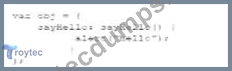
Which code segment calls the method?
- A. Window,sayhello();
- B. Obj,sayHello;
Answer: B
Explanation:
To call thesayHellomethod in the given JavaScript object, you need to use the object's name followed by the method name with parentheses.
* Correct Method Call:
* Given the object definition:
var obj = {
sayHello: function() {
alert("Hello");
}
};
* To call the methodsayHelloon the objectobj:
obj.sayHello();
* Explanation:
* Option A:Obj.sayHello;is incorrect syntax. The correct syntax isobj.sayHello();.
* Option B:Window.sayHello();is incorrect because the method is defined in theobjobject, not thewindowobject.
:
MDN Web Docs - Functions
W3Schools - JavaScript Objects
NEW QUESTION # 55
What is an advantage that mobile websites have over mobile apps when it comes to development?
- A. Code that runs locally
- B. Ability to use all device capabilities
- C. Cross-platform portability
- D. Full control of the user interface
Answer: C
Explanation:
> "Mobile websites are accessible through browsers and are built using standard technologies (HTML, CSS, JavaScript). As a result, they are inherently cross-platform and do not require separate versions for iOS, Android, etc."
>
> In contrast, mobile apps are platform-specific and need to be built and maintained separately.
References:
* Web Application Development Best Practices
* MDN Web Docs: Mobile Web vs. Native Apps
---
NEW QUESTION # 56
......
Updated PDF (New 2025) Actual WGU Web-Development-Applications Exam Questions: https://www.troytecdumps.com/Web-Development-Applications-troytec-exam-dumps.html
Dumps Moneyack Guarantee - Web-Development-Applications Dumps Approved Dumps: https://drive.google.com/open?id=1qOovHi6-A8muuYfScCz43mDJH1ifarU7